创建模组
本文档介绍如何编译模组dll,使其能够实现把模型复制到指定目录的功能。
模组工作原理
模组的主要作用是在被加载时,自动将模型包复制到游戏的模型目录:
游戏安装路径/ModConfigs/DuckovCustomModel/Models这样玩家只需要在游戏的模组管理器中启用你的模组,模型就会自动安装。
编译Mod DLL
目前有两种编译方式,一种是使用SDK来编译,另一种是手动使用开发工具编译。更推荐使用SDK编译,因为这种方式简单得多。
使用SDK编译(推荐)
如果安装了DCM SDK,可以使用SDK来编译模组DLL。请查看DCM SDK介绍页面。
手动编译
开发环境设置
必需工具
Rider 或 Visual Studio
- 用于编写和编译 C# 代码
- 推荐使用 Rider(JetBrains 出品)
.NET Framework 2.1
- 模组建议使用 .NET Framework 2.1 标准
创建项目
- 打开 Rider 或 Visual Studio
- 创建新项目:
- 项目类型:类库(Class Library)
- 目标框架:.NET Framework 2.1 或 .NET Standard 2.1
- 语言:C#
- 项目命名示例:
MyModelMod
TIP
如果 .NET Framework 2.1 不可用,可以尝试 .NET Standard 2.1 或 .NET Framework 4.x。
编写模组代码
添加引用
首先需要添加必要的 DLL 引用,通过编辑项目的csproj来引入游戏的DLL。
如果使用的是Rider,使用快捷键Ctrl+T打开快速搜索,输入csp来快速定位csproj文件并打开
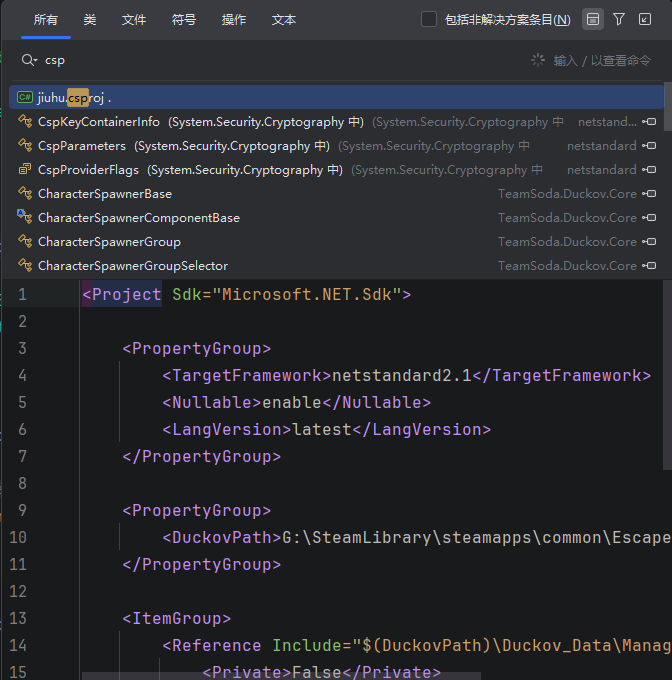
复制以下代码块中的内容到你的csproj文件:
其中DuckovPath需要修改为你的鸭科夫的游戏路径
xml
<Project Sdk="Microsoft.NET.Sdk">

    <PropertyGroup>
        <TargetFramework>netstandard2.1</TargetFramework>
        <Nullable>enable</Nullable>
        <LangVersion>latest</LangVersion>
    </PropertyGroup>

    <PropertyGroup>
        <DuckovPath>E:\SteamLibrary\steamapps\common\Escape from Duckov</DuckovPath>
    </PropertyGroup>

    <ItemGroup>
        <Reference Include="$(DuckovPath)\Duckov_Data\Managed\TeamSoda.*">
            <Private>False</Private>
        </Reference>
        <Reference Include="$(DuckovPath)\Duckov_Data\Managed\Unity*">
            <Private>False</Private>
        </Reference>
        <Reference Include="$(DuckovPath)\Duckov_Data\Managed\Newtonsoft.Json.dll">
            <Private>False</Private>
        </Reference>
    </ItemGroup>

    <ItemGroup>
        <None Update="info.ini">
            <CopyToOutputDirectory>PreserveNewest</CopyToOutputDirectory>
        </None>
    </ItemGroup>

</Project>
基础模组代码
创建一个新的 C# 类文件(ModBehaviour.cs),添加以下代码:
其中命名空间DuckovCustomModelRegister需要改成你的项目的命名空间。
csharp
using System;
using System.IO;
using UnityEngine;

namespace DuckovCustomModelRegister
{
    public class ModBehaviour : Duckov.Modding.ModBehaviour
    {
        public const string TargetModId = "DuckovCustomModel";

        private static string? _modConfigsRootPath;
        private static bool _isInitialized;

        public static string ModDirectory => Path.GetDirectoryName(typeof(ModBehaviour).Assembly.Location)!;
        public static string ModelDirectory => Path.Combine(GetModConfigDirectory(TargetModId), "Models");

        private static string ModConfigsRootPath
        {
            get
            {
                if (_isInitialized) return _modConfigsRootPath!;
                InitializePath();
                _isInitialized = true;

                return _modConfigsRootPath!;
            }
        }

        private void OnEnable()
        {
            CreateModelDirectoryIfNeeded();
            CopyModels();
        }

        private static void InitializePath()
        {
            var installPath = Path.Combine(Application.dataPath, "..", "ModConfigs");
            installPath = Path.GetFullPath(installPath);

            if (IsDirectoryWritable(installPath))
            {
                _modConfigsRootPath = installPath;
                Debug.Log($"[DuckovCustomModelRegister] Using install directory for ModConfigs: {_modConfigsRootPath}");
                return;
            }

            Debug.LogWarning(
                $"[DuckovCustomModelRegister] Install directory is read-only, using persistent data path instead: {installPath}");
            _modConfigsRootPath = GetPersistentDataPath();
            Debug.Log($"[DuckovCustomModelRegister] Using persistent data path for ModConfigs: {_modConfigsRootPath}");
        }

        private static bool IsDirectoryWritable(string directoryPath)
        {
            try
            {
                if (!Directory.Exists(directoryPath)) Directory.CreateDirectory(directoryPath);

                var testFile = Path.Combine(directoryPath, ".writetest");
                File.WriteAllText(testFile, "test");
                File.Delete(testFile);
                return true;
            }
            catch (Exception ex)
            {
                Debug.LogWarning(
                    $"[DuckovCustomModelRegister] Directory is not writable: {directoryPath}, Error: {ex.Message}");
                return false;
            }
        }

        private static string GetPersistentDataPath()
        {
            var persistentPath = Application.persistentDataPath;
            var modConfigsPath = Path.Combine(persistentPath, "ModConfigs");

            if (Directory.Exists(modConfigsPath)) return modConfigsPath;
            try
            {
                Directory.CreateDirectory(modConfigsPath);
            }
            catch (Exception ex)
            {
                Debug.LogError(
                    $"[DuckovCustomModelRegister] Failed to create ModConfigs directory at persistent path: {ex.Message}");
                throw;
            }

            return modConfigsPath;
        }

        private static string GetModConfigDirectory(string modId)
        {
            return Path.Combine(ModConfigsRootPath, modId);
        }

        private static void CreateModelDirectoryIfNeeded()
        {
            if (Directory.Exists(ModelDirectory)) return;
            Directory.CreateDirectory(ModelDirectory);
        }

        private static void CopyModels()
        {
            var sourceDir = Path.Combine(ModDirectory, "Models");
            CopyFolder(sourceDir, ModelDirectory);
        }

        private static void CopyFolder(string sourceDir, string destDir)
        {
            if (!Directory.Exists(sourceDir)) return;
            if (!Directory.Exists(destDir)) Directory.CreateDirectory(destDir);

            foreach (var filePath in Directory.GetFiles(sourceDir))
            {
                var fileName = Path.GetFileName(filePath);
                var destFilePath = Path.Combine(destDir, fileName);
                File.Copy(filePath, destFilePath, true);
            }

            foreach (var directory in Directory.GetDirectories(sourceDir))
            {
                var dirName = Path.GetFileName(directory);
                var destSubDir = Path.Combine(destDir, dirName);
                CopyFolder(directory, destSubDir);
            }
        }
    }
}
编译模组
构建项目
- 在 Rider/Visual Studio 中,选择 生成(Build) > 生成解决方案(Build Solution)
- 或使用快捷键:
Ctrl + Shift + B
查找输出文件
编译完成后,DLL 文件通常位于:
项目目录/bin/Debug/net21/MyModelMod.dll或
项目目录/bin/Release/net21/MyModelMod.dllTIP
建议使用 Release 配置进行最终构建,以获得更好的性能。
配置 info.ini
在模组根目录创建 info.ini 文件,配置模组的信息:
ini
name = DuckovCustomModelRegister
displayName = Duckov Custom Model Template Model
description = A template mod for adding custom models to Duckov Custom Model.
字段说明
| 字段 | 说明 | 示例 |
|---|---|---|
Name | 模组名称,需要和模组命名空间对应 | jiuhu |
displayName | 模组显示名称 | 酒狐 |
description | 模组描述 | 把玩家模型替换为酒狐 |